Thursday, April 2, 2009

What is Microsoft Forefront?
Microsoft Forefront is relatively new and just beginning to get real traction in the network security market.

The first thing is that there is no “Forefront” product. Instead, Forefront is a collection of Microsoft security products. This collection of Forefront security products is referred to as the “Forefront Security Suite”

There are three collections of security products included in the Forefront Security Suite. These include:

  • Forefront Edge — Forefront Edge products include the Forefront Threat Management Gateway (the next version of ISA Server) and the Forefront Intelligent Access Gateway 2007 (IAG 2007). The next version of IAG will be part of the Forefront Security Suite and the product will be renamed to Forefront Unified Access Gateway (UAG).
  • Forefront Server Security — There are three products that comprise the Forefront Server Security collection. These are Forefront Security for Exchange, Forefront Security for SharePoint and Forefront Security for Office Communications Server.
  • Forefront Client Security — There is one product in this collection — Microsoft Forefront Client Security (FCS).

In the future, there is likely to be another member of the Forefront family of security products, Forefront code-named “Stirling”. Stirling is a comprehensive configuration, management and reporting console that allows you to configure, management and report on the activities of all the members of the Forefront family of security products. In addition, Stirling will allow you to create proactive response policies, so that information gathered from one member of the Forefront Security Suite can be used to trigger a response by other members of the suite. Stirling will enable you to create incident response policies so that corrective actions take place immediately, instead of having to wait for you to receive and alert and implement a response manually. The first version of Stirling will probably only support a subset of Forefront products, which the long term goal being support for all members of the Forefront Security Suite.

Microsoft Forefront Family Products
Forefront family products include security servers that perform a wide range of security functions. Members of the Forefront family include:

  • Forefront Threat Management Gateway (TMG). TMG is the next version of ISA Server. In contrast to the .1 upgrade we saw with ISA 2004 to ISA 2006, the TMG is a major rewrite and feature enhanced version of the ISA firewall. Major investments have been made to improve anti-malware and anti-virus scanning for Internet downloads, and the TMG will include site filtering based on category. There are many more features planned for the RTM release of the TMG. In addition, TMG runs only on 64bit Windows Server 2008, so should expect to see major improvements in performance and stability that only a 64bit platform can provide.
  • Forefront Intelligent Application Gateway 2007 (IAG 2007). The Forefront IAG 2007 is an SSL VPN gateway. IAG 2007 can be used to publish Web servers in traditional reverse Web Proxy fashion, or you can create customized portals that provide users one click access to applications hosted on the corporate network. IAG 2007 portals provide access to both Web and non-Web based applications. Non-Web based applications take advantage of IAG 2007 port and socket forwarding features, so that even complex protocols like Outlook/Exchange MAPI connections will work over an SSL connection. And for users who need full network layer access, IAG 2007 includes the “Network Connector” feature that enables users to establish a full network layer tunnel over an SSL connection. IAG 2007 also includes easy to configure and powerful endpoint detection and information wiping on client computers.
  • Forefront Server Security for Exchange (FSE), SharePoint (FSS) and Office Communications Server. These three products provide anti-virus and anti-malware protection for Exchange, SharePoint and OCS. These products can be used to scan e-mail or libraries for existing malware, and can be used to configure them to prevent users from uploading malware. Up to 5 anti-virus engines can be used at the same time, and policies configured to use a user-defined mix of engines, depending the level of confidence and performance you desire. In addition, these products allow to configure content filtering rules, so that we can block specific file types or documents containing forbidden strings. Each product has comprehensive logging and reporting features. They are all easy to configure, manage and update. At this time OCS is in beta testing and its full feature set is in flux, but we can expect it to provide similar anti-virus and anti-malware protection as the other products in the Forefront Server Security suite.
  • Forefront Client Security (FCS). Forefront Client Security is an enterprise grade desktop and server anti-virus and anti-malware platform. Forefront Client Security includes both client and server components. You can use Forefront Client Security to deploy the anti-malware agent too all machines, or selected machines, on the network using Group Policy or any other software distribution mechanism you like. Forefront Client Security scans client and server systems for viruses and malware, and also performs security state assessments that are reported to the Forefront Client Security console. Forefront Client Security can scale from a single server solution, to one that includes a separate servers for the 6 different Forefront Client Security server roles. Using the Forefront Client Security enterprise management console, Forefront Client Security can be configured to support up to 100,000 users.
  • Forefront “Stirling”. Forefront “Stirling,” is a single product that delivers unified security management and reporting with comprehensive, coordinated protection across an organization’s IT infrastructure. The Stirling console will allow to configure, manage, and receive reporting information from all members of the Forefront Security Suite. In addition to unified management, we will be able to configure Stirling policies that enables creation of proactive incident response policies. Stirling will be able to gather security information from all Forefront products it manages and monitors, and then will be able to use that information to trigger incident response policies that fire off automatically without requiring administrator intervention. In addition to integrating Forefront products, Stirling will also leverage Windows Server 2008 Network Access Protection to isolate compromised machines from the network.


Summary
Microsoft Forefront is a collection of Microsoft security products aimed at protecting the network edge, key server applications including Exchange, SharePoint and OCS, and client and server systems with host-based anti-virus and anti-malware protection. At this time these products work separately and configuration, management and reporting work through different consoles. In the future, with the release of Forefront Stirling, a single console will expose configuration, management and reporting functionality through a single interface.

Friday, March 27, 2009

Silverlight Web Part for Sharepoint

In this post, we are going to see integrating the webpart with Silverlight contents on SharePoint Site.

For that, we need to combine all required java script and Xaml files (used to display the Silverlight content) in to single assembly without any dependent files. It makes sense to embed the Xaml and java script file as a resource and reference it in programming using the WebResource.axd handler mechanism for extracting embedded resources.

1. Create a Webpart project and create or add the required java script and Xaml files to the project.
Include some files Silverlight.js, Scene.js and Scene.xaml


2. Set the BuildAction property to “Embedded Resource” in properties window for each java script and Xaml.
This will use to include the files as Resources in an assembly.

3. Add the assembly-level attribute System.Web.UI.WebResource to grant permission for these resources to be served by WebResource.axd and to associate MIME type for the response.

[assembly: WebResource("Arun.Silverlight.js", "text/javascript" )]
[assembly: WebResource("Arun.Scene.js", "text/javascript")]
[assembly: WebResource("Arun.Scene.xaml", "text/xml")]

Now JavaScript and Xaml files are compiled into my assembly as embedded resources.

4. Now, we can use the RegisterClientScriptresource() method of the Page.ClientScriptManager class to rendered the page with the referenced files.

this.Page.ClientScript.RegisterClientScriptResource(GetType(), "Arun.Silverlight.js"); this.Page.ClientScript.RegisterClientScriptResource(GetType(), "Arun.Scene.js");

Include the above lines in the PreRender method to register the javascript files for the webpart.

5. Add the following lines to the RenderWebPart method to host the < div > tag and call the Silverlight content to the webpart,

string strLoad = "Silverlight.createDelegate(scene, scene.handleLoad)";

output.WriteLine("
");

output.WriteLine("
");

The method GetWebResourceUrl(GetType(), "Arun.Scene.xaml") used to retrieve the Url of the Xaml file from WebResource.axd.


Tuesday, March 24, 2009

Code Contracts

Code Contracts provide a language-agnostic way to express coding assumptions in .NET programs. The contracts take the form of preconditions, postconditions, and object invariants. Contracts act as checked documentation of your external and internal APIs. The contracts are used to improve testing via runtime checking, enable static contract verification, and documentation generation.

Code Contracts bring the advantages of design-by-contract programming to all .NET programming languages.


The benefits of writing contracts are:

Improved testability
  • each contract acts as an oracle, giving a test run a pass/fail indication.
  • automatic testing tools, such as Pex, can take advantage of contracts to generate more meaningful unit tests by filtering out meaningless test arguments that don't satisfy the pre-conditions.

Static verification tools can takes advantage of contracts to reduce false positives and produce more meaningful errors.


API documentation Our API documentation often lacks useful information. The same contracts used for runtime testing and static verification can also be used to generate better API documentation, such as which parameters need to be non-null, etc.


Using a set of static library methods for writing preconditions, postconditions, and object invariants as well as two tools from Micrsosoft:

  • ccrewrite, for generating runtime checking from the contracts
  • cccheck, a static checker that verifies contracts at compile-time.

The plan from Microsoft is to add further tools for

  • Automatic API documentation generatio
  • Intellisense integration

The use of a library has the advantage that all .NET languages can immediately take advantage of contracts. There is no need to write a special parser or compiler. Furthermore, the respective language compilers naturally check the contracts for well-formedness (type checking and name resolution) and produce a compiled form of the contracts as MSIL. Authoring contracts in Visual Studio allows programmers to take advantage of the standard intellisense provided by the language services. Previous approaches based on .NET attributes fall far short as they neither provide an expressive enough medium, nor can they take advantage of compile-time checks.

Contracts are expressed using static method calls at method entries. Tools take care to interpret these declarative contracts in the right places. These methods are found in the System.Diagnostics.Contracts namespace.
• Contract.Requires takes a boolean condition and expresses a precondition of the method. A precondition must be true on entry to the method. It is the caller's responsibility to make sure the pre-condition is met.
• Contract.Ensures takes a boolean condition and expresses a postcondition of the method. A postcondition must be true at all normal exit points of the method. It is the implementation's responsibility that the postcondition is met.

Watch this space for more developments in this area.

Source: http://research.microsoft.com/en-us/projects/contracts/

Thursday, March 5, 2009

Cloud Computing through the lens of SOA

Cloud computing is a style of computing that defines the way IT functions are going to be delivered or acquired in the future. This can essentially be contributed due to the emergence of revolutionary technologies such as Virtualization, Service oriented Architecture and the Web.

I will attempt to explain the influence of these technologies on the formation of the "Cloud".Let me do this by first highlighting some key attributes that basically characterizes the “Cloud”. Followed by, describing how these emerging technologies meet to address them.

ABC's of the “Cloud”:
Adapt: Being scalable and elastic to meet fluctuating resource demands
Black-Boxed: Delivery of capabilities “as a service”
Focus is on the Results and Not on Components
Delivery Service Levels are Critical
Commune: Anyone Anywhere Anytime access
The amalgamation of Virtualization, Service oriented Architectures based on open standards along with the pervasive nature of the Internet has made IT services generally available at global scales. Now let’s look at how these technologies principally function to meet the ABC’s of the cloud:

Virtualization:
Virtualization technologies such as Hyper-V, VMware, Citrix have de-coupled software from the hardware making it possible to run multiple software instances on a single hardware. The technology allows IT administrators to seamlessly Ramp up/down computational capabilities such as processor, storage, RAM in a matter of hours or even minutes. Virtualization has enabled efficient use of shared resources along with the de-coupling increasing the economies of scale of computing.

Services:
"Functionality being delivered through a platform independent contract" is the key design principle behind service oriented application. This makes service consumers consume information by being de-coupled from the technical implementation of the provider and focus only on the results. Also being self contained, services can be designed or managed at a unit level hence allowing for more granular control of service levels.

Web:
The global pervasiveness and the open standards of the Internet have made this technology as the de-facto mode of delivering IT-services on the public cloud. Although one may also argue that in case of private clouds, say within an enterprise, the use of private networks may enable cloud-style environments delivery capabilities without ever using Internet technologies. However from a universal accessibility stand-point the access over such channels may be confined to that within the enterprise boundaries limiting the openness otherwise observed on the cloud.

Wednesday, February 18, 2009

Tuesday, February 10, 2009

BizTalk 2006 Code Samples

This news is a little old now, but there are a whole heap of BizTalk Server Code samples that were released to MSDN back in June 06.

http://msdn.microsoft.com/biztalk/downloads/samples/
Take a look at this list:

Publishing and Consuming Web Services with SOAP HeadersThis sample demonstrates how to publish a BizTalk orchestration as a Web service with a SOAP header and how to consume the SOAP header from a Web service request message.

BAM and HAT CorrelationThis sample demonstrates how to use the enhanced BAM features, and how to customize BAM and HAT integration. This sample also includes a Windows Forms application customizing BAM and HAT integration for the sample BizTalk solution.

Consuming Web Services with Array ParametersThis sample demonstrates how to consume Web services with array parameters.

Extending the BizTalk Server Administration ConsoleThis sample demonstrates how to use the Microsoft Management Console (MMC) 2.0 Software Development Kit (SDK) to extend the functionality of the BizTalk Server Administration console with your own custom menu items, node items, new data items and views, or different views of existing data.

Viewing Failed Tracking DataThis sample uses Windows Forms to provide a simple interface to view and resubmit failed messages.

Inserting XML Nodes from Business RulesThis sample demonstrates how to insert nodes into an XML document and set their values from a business rule by using the XmlHelper class.

Using the Mass Copy FunctoidThis sample demonstrates the use of the Mass Copy Functoid to map a source hierarchy to a destination hierarchy without mapping each individual element by hand.

Using Role LinksThis sample demonstrates how to use role links and parties.

Split File PipelineThis sample uses the FILE adapter to accept an input file containing multiple lines of text into a receive location.

Using Enterprise Library 2.0 with BizTalk ServerThis sample demonstrates how to use Enterprise Library 2.0 with BizTalk Server.

Consuming Web ServicesThis sample demonstrates how to consume Web services in a messaging-only scenario, and without using the Add Web Reference option.

Console AdapterThis sample consists of a C# console application that instantiates and hosts an instance of the receive adapter. The adapter is a Visual Studio 2005 class library that invokes the BizTalk Server 2006 APIs.

Delivery NotificationThis sample demonstrates how acknowledgments work and how to use delivery notification.

Using Long-Running Transactions in Orchestrations This sample demonstrates how to use long-running transactions in orchestrations.

Using the Looping FunctoidThis sample transforms catalog data from one format to another by using the Looping functoid.

Mapping to a Repeating StructureThis sample demonstrates how to map multiple recurring records in an inbound message to their corresponding records in the outbound message in the BizTalk Mapper.

Parallel Convoy This sample demonstrates how to design the parallel convoy pattern in BizTalk Orchestration Designer.

Policy ChainingThis sample demonstrates how to invoke a policy from another policy by calling the Execute method of the Policy class exposed directly by the Microsoft.RuleEngine assembly.

Recoverable Interchange Processing Using Pipelines This sample demonstrates how to implement recoverable interchange processing.

Using the Table Looping Functoid This sample demonstrates the use of the Table Looping functoid in gated and non-gated configurations.

Using the Value Mapping and Value Mapping (Flattening) FunctoidsThis sample demonstrates the use of the Value Mapping and Value Mapping (Flattening) functoids to transform data between different message formats.

Direct Binding to an OrchestrationThis sample processes fictitious loan requests using orchestrations with ports that are directly bound to another orchestration

Direct Binding to the MessageBox Database in Orchestrations This sample processes fictitious loan requests using orchestrations with ports that are directly bound to the MessageBox database.

Using a Custom .NET Type for a Message in OrchestrationsThis sample processes fictitious
customer satisfaction survey responses from clients who spend time at different resort properties. Clients assign an overall satisfaction rating and can optionally enter a contact address and request a personal response. A request for a personal response generates a new message that is forwarded to a customer service application for tracking and follow-up.

Writing Orchestration Information as XML Using the ExplorerOM APIThe sample performs two tasks. First, it writes configuration information for all orchestrations defined for a BizTalk server into a user-specified XML file. It then optionally transforms the XML data into a simple HTML report. This is accomplished through a console application.

Correlating Messages with Orchestration InstancesThis sample receives a purchase order (PO) message from a fictitious customer and processes the purchase order message using correlation.

SSO as Configuration StoreThis sample provides an implementation of a sample class and a walkthrough that demonstrates how to use the SSO administrative utility and the SSOApplicationConfig command-line tool.

Atomic Transactions with COM+ Serviced Components in OrchestrationsThis sample demonstrates how atomic transactions work in orchestrations.

Exception Handling in OrchestrationsThis sample demonstrates how to handle exceptions in an orchestration.

Implementing Scatter and Gather PatternThis sample demonstrates how to implement the Scatter and Gather pattern using BizTalk Orchestration Designer.

Using the SQL Adapter with Atomic Transactions in OrchestrationsThis sample shows how to use the SQL adapter with atomic transactions to keep databases consistent.

Wednesday, February 4, 2009

Custom Alerts in SharePoint 2007

In SharePoint 2007 we have a great feature called Alerts, basically it sends an email when something in a list or library (or view) is changed. I’m sure I don’t need to tell anyone about them, but when it comes to actually applying them, it would be ideal to be able to customise the alerts for your own application.

So not only might you want to change the presentation of the email that you send as an alert, but you may also want set certain custom conditions for when an alert is triggered.
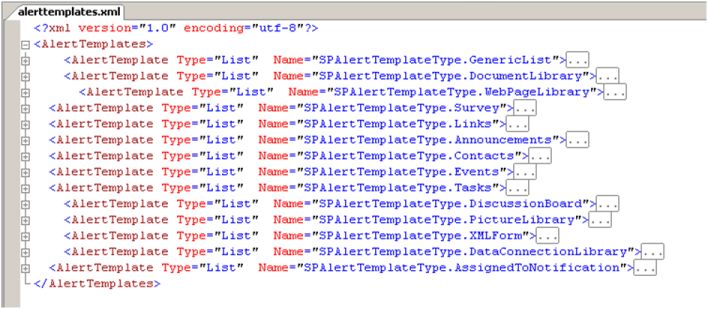
The alert template xml file is located in the 12 Hive at C:\Program Files\Common Files\Microsoft Shared\web server extensions\12\TEMPLATE\XML\alerttemplates.xml, if you open the file you will see all the different alerts for each type of list/library.

Either make a backup of the original file, or create your own copy (we will register the alert file later) and rename the file eg. CustomAlertTempates.xml
Copy the GenericList node and paste below the other nodes and rename.

If you expand this node you will see the child nodes EventTypes, Format (Digest & Immediate), Properties, and Filters.

If we look at the Format Node first, there are two types of formatting available, Digest and Immediate. Each contains a large amount of xsl/html that controls the output html of the alert email. The digest node controls the daily/weekly summary alerts, and the immediate node controls the alerts sent immediately (obviously!).
Change some of the html in the Immediate node so you can test whether the alert is using your template, eg.

The next step is to register and test your new alert type. For this you use STSADM from the command prompt to register the new alert file for a particular Site Collection.

stsadm -o updatealerttemplates -url http://yoursite/sites/sitecollname -filename “C:\Program Files\Common Files\Microsoft Shared\web server extensions\12\TEMPLATE\XML\CustomeAlertTemplates.xml”

Now to set a particular alert to use your new specific template, you can set the AlertTemplate for the list programmatically.

SPList spList = null;
spList = spWeb.Lists[listName];
SPAlertTemplate newTemplate = new SPAlertTemplate();
newTemplate.Name = “SPAlertTemplateType.MyCustomAlertType“;
spList.AlertTemplate = newTemplate;spList.Update();
Or you can create an individual alert programmatically…
SPAlert spAlert = spUser.Alerts.Add();
spAlert.Title = alertName;
spAlert.EventType = SPEventType.Modify;
spAlert.AlertFrequency = SPAlertFrequency.Immediate;
spAlert.AlertType = SPAlertType.List;
spAlert.List = spWeb.Lists[listName];
spAlert.Filter = QueryBuilder(spUser.Name);
SPAlertTemplate newTemplate = new SPAlertTemplate();
newTemplate.Name = “SPAlertTemplateType.MyCustomAlertType“;
spAlert.AlertTemplate = newTemplate;


Once this has been registered, recycle the web app application pool, or reset IIS, then test the new alert. You should find the email alert will now include your new HTML.
So that’s how to change the HTML of an alert, in the next post I’ll create a new custom filtering option that will appear through the UI.

TIP: By default the timer job that runs the alert jobs runs every 5 minutes. And if you’re debugging that can be a painfully slow process, unless you enjoy heaps of coffee breaks! Anyway I decided I didn’t need that much coffee, so I changed the alert timer job to run every minute instead of every five.

SPJobDefinitionCollection spJobs = SpWeb.Site.WebApplication.JobDefinitions;
foreach (SPJobDefinition job in spJobs)

{
if (job.Id.ToString() == TaskGuid)

{
string guid = job.Id.ToString();
string name = job.DisplayName;
SPMinuteSchedule newSchedule = new SPMinuteSchedule();
newSchedule.BeginSecond = 0;
newSchedule.EndSecond = 59;
newSchedule.Interval = minutes;
job.Schedule = newSchedule;
job.Update();
}
}

Sunday, February 1, 2009

Web Content Management

Web Content Management or WCM in short is one of the more interesting topics on MOSS. This blog aims to provide an overview of WCM, explain what is WCM, why is it special and more importantly, how is it useful for you.

So what is WCM in simple terms ?
WCM is a rich content authoring and management platform. It provides a set of controls and publishing features that allow the site owners to host content centric sites. It takes care of the site branding, publishing, content authoring, workflows etc. WCM forms a part of the Enterprise content management solution, which in turn forms a part of MOSS 2007. It also leverages the Office Word and Infopath.

In short it is a very scalable solution that separates the content and presentation, relieving the burden on the IT department.To better understand the solution that WCM provides, we need to understand the problem first.

Managing a content centric web site is by no means a simple task. In most of the organization, it will be the IT team that will have access to add new pages, maintain the pages and keep the site running smoothly. The content contributor has to undergo the overhead of approaching the IT staff for each and every change. This translates to longer process and higher cost of operation. Many a times the content will have to be edited a few times before it is correctly published.

This is where WCM comes into picture. WCM provides a platform. It defines the site branding, sets the templates, look and feel, authoring rules, publishing rules, workflows, various levels of securities etc.

The content contributor can now focus on his content alone and leave the development hassles aside. He simply submits his data. This will in turn validate the data, start the workflows, approval cycles and finally publish the content without the support of IT staff. The final content will be published in accordance with the look and feel of the rest of the site.
WCM incorporates all features in Microsoft content management server 2002 (MCMS). Microsoft has discontinued providing CMS as a separate product, but instead, it provides the enhanced version ( WCM ) along with MOSS 2007.

Some of the important features of the WCM are listed below.

  • Workflows
  • Search functionality
  • RSS facilities
  • Built in Caching mechanism
  • Supports multiple devices
  • Better Versioning mechanism
  • More events captured
  • Pluggable Authentication
  • Reusable Content
  • Web based management

Having said all this, Does this really make sense?
A content heavy web site will have frequent changes. New pages will be added by various contributors. Managing the new pages, recording the version history, validating data, format etc is a mammoth task. Creating a application to handle the same will cost a fortune. WCM automates most of the processes and brings the focus to what matters the most, the content. This way, the contributor will be able to focus more on the data and be able to publish the content in a quick efficient manner.
The process does not require support from the IT department as the contributor can himself manage the content online. Thus saving a lot of effort as well as money.
In short, WCM saves Time and Money. And that makes a lot of sense.

Sunday, January 18, 2009

Identify the Subtle Bug.....

A friend of mine pointed me out to this.

This code has a subtle bug. What is it?
Hint: it has nothing to do with encryption.


using(RijndaelManaged enc=new RijndaelManaged(){Key=key,IV=iv,Mode=CipherMode.CBC })
{
//DO SOME WORK WITH enc
}


So to outline what and why this doesn’t do what is expected let’s review what this code is
shorthand for.

First:The using block is actually shorthand for a particular try … finally pattern.Roughly this code:

using (SomeDisposableType item = new SomeDisposableType()){}


Is equivalent to:


SomeDisposableType item = null;
try
{
item = new SomeDisposableType();
//DO WORK
}
finally
{
If (item != null) item.Dispose();
}


Depending on how IDisposable is implemented, there could be an implicit cast to the interface involved as well so you’d see ((IDisposable)item).Dispose(); in the finally block instead. Meaningless to the current concept however.

The new C# feature of Object Initializers are another form of syntatic sugar for really this:

SomeTypeWithSetters item = new SomeTypeWithSetters();
Item.Prop1 = “SomeValue”;


By writing it this way:

SomeTypeWithSetters item = new SomeTypeWithSetters(){Prop1=“SomeValue”}


So when you put them together (as in the original example) you would expect the code would be equivalent to this:


RijndaelManaged enc = null;
try
{
RijndaelManaged enc = new RijndaelManaged();
enc.Key = key;
enc.IV = iv;
enc.Mode = CipherMode.CBC;
//DO WORK WITH enc
}
finally
{
if (enc != null) enc.Dispose();
}


This is NOT the case however (and hence the bug)!Due to the nested statement rules in the C# spec, instead the compiler evaluates the code as a nested initializer block followed by a completely separate using block and not a unioned language construct!


RijndaelManaged enc = new RijndaelManaged();
enc.Key = key;
enc.IV = iv;
enc.Mode = CipherMode.CBC;
try

{
//DO WORK WITH enc
}
finally
{
if (enc != null) enc.Dispose();
}


Note: technically the compiler will actually emit two variables pointing to the same object. For clarity I’ve skipped that as it’s frankly not important to the example.

So if there’s something that goes hinky in the initializer block, the Dispose() method is NEVER called by your using block as the code has yet to enter it. All sorts of general badness may then follow. It might be as simple as inefficient use of critical or expensive resources to something as bad as a leak. In general, all sorts of badness, in varying degrees of said badness, may happen to your application.

After that: Hilarity Ensues followed by an immediate Epic Fail.


While I agree that this should be handled by a C# language specification change regarding how the using construct works with nested statements, this is currently how it works today. While not a bug per say in the compiler, it should be considered a hole in the spec itself. Maybe we’ll see this as a change in C# 4.0?


Original Credits : Jimmy Zimmerman
Source: http://ayende.com/Blog/archive/2009/01/15/avoid-object-initializers-amp-the-using-statement.aspx


Thursday, January 15, 2009

Cloud Computing and Economy

Cloud computing is a style of computing which packages computing resources such as processing power, storage, connectivity etc as a service and delivering the same to the consumer in a scale-free, cost efficient and timely manner over the web. Applications get into production much quicker than the traditional models by which applications are provisioned. This entails a shift in the way applications would be built, executed and also managed in the future.

In an attempt to understand the financial implications of the new cloud based model used for deploying and running web applications over the traditional client server web application model a little better, I will try and put it in the context of a hypothetical scenario which would highlight differences one would observe in both the cases.

A startup company that intends to have some web presence decides to build a self service web application which shall receive orders from their end customers. From a architectural perspective, they decided to build a simple data driven web application that is easily available over the internet to their customers. Let us assume that the application designed is a traditional 2 –tiered client server architecture.


So what is it that is required to build an application which is available over the Internet?

An attempt to mark out some of the key asks are in the list below and classified them under the various costing heads

Capital Expenditure
1. Construct a physical brick and mortar facility to host the servers including the cabling, USP/Generators to keep the server always ON
2. Procure a server grade hardware(s) for the client and server setup. In case you have availability requirements then you would have at the minimum two servers that bring in some redundancy to help achieve this. Additionally we would have to include redundant component such as NICs, UPS’s, switches
3. Software Licenses required to build High-Available web applications Windows Server OS’s, NLB, firewalls and security solutions such as ISA
4. Additional hardware and software cost required for setting up an available DNS server to resolve client requesting name resolution
5. Provision a static IP from your ISP
6. Database software licenses would have to be purchased
7. Operations and Management software licenses such as MOM, backup facilities.
8. Purchase a development system, assuming that you would want to have your development

environment separate from the production site
9. At the minimum Win XP license for developers
10. Purchase the Visual studio licenses to develop the web application
11. Purchase the developer edition db license for the persistent storage


Operational Cost
1. Registering your DNS addresses with ICANN
2. Per unit power charges for keeping the production systems always ‘ON’ including power consumed by the hardware, air-conditioning
3. Salaries to maintain and manage the infrastructure


Non-Operational Costs:
1. Carbon tax for companies running their own data centers


Opportunity Loss:
1. Sub-optimally utilized hardware
2. More time to market involved mainly due to the time spend on procuring and provisioning the resources


Now comparing this to an application which adopts to a cloud based architecture

The costs which shall be incurred would include:

Capital Expenditure:
1. Purchase a development system, assuming that you would want to have your development environment separate from the production site
2. At the minimum Win XP license for developers
3. Purchase the Visual studio licenses to develop the web application


Operational Cost:
1. Per unit charge to use the cloud OS services which will execute the web application
2. Per unit charge to use the cloud db services


As can be seen a business has been able to considerably eliminate its capital expenditure on IT, resulting in tremendous savings. Savings allows firms to invest in its core business areas that would lead to revenue generation. Moreover in these times of economic recession, credit for businesses is not easily available; hence any savings that businesses can achieve will help them to have that much extra to run the business.

In addition to having direct financial implications in terms cost, the cloud platform also help in enhancing the Time to Market of software applications

Time is Money
It’s an old cliché we all know and understand, but to what extent do we see IT able to support businesses in applying this in principle. Businesses have lost out on opportunities simply because the systems which they have build over the past decade or so have now become inept or non-responsive to cater to the growing dynamics of the business. Their architectures do not allow them to adapt to the dynamically changing requirements or even for that matter be elastic to cater to fluctuating user demand. Some factors effecting an applications Time to Market:
1. Time is spent on procuring or provisioning hardware or software while deploying a new application.
2. Time is spent on procuring or provisioning additional hardware if existing applications have to handle any growth in business such as during mergers/acquisitions, seasonal or market.
The evolution of the Web, SOA and Virtualization technologies have now amalgamated to herald this new style of computing. The Cloud inherits the intrinsic traits of these three technologies which allow enterprises adapting to this new style of computing build applications which are available everywhere, become agile and elastic to meet fluctuating user demand. It not only extends existing on-premise/hosted applications but also gives opportunities to realize existing architectural patterns more easily or even discover new patterns in which applications get developed, provisioned and delivered. All this in a relatively shorter span of time as compared to the traditional approach of constructing and commisioning applications.

Tuesday, December 9, 2008

Asynchronous Programming and Power Threading

Many of us who've had experience with asynchronous development know how difficult such code can be to write. Asynchronous code is typically non-linear, and jumps from one portion of a program to another. It is difficult to debug, and is difficult to tame if errors occur.
To understand the difficulties inherent in asynchronous development it helps to first consider a simple example.


Suppose you begin an IO operation of some kind, perhaps the download of a large file. The download is going to take several minutes. To avoid locking up your program during the download, you set up a thread on which the operation can run. You start the thread, call it from your main thread, and set up a callback method which can be executed when the operation completes. Because the download is run on a secondary thread, the main thread of your program is still responsive during the download, and can interact with the user. When the task completes, the callback is executed, thereby announcing the termination of the download. You might then have a new asynchronous task that you might want to begin, such as processing the downloaded file and adding portions of its content to a database. Again, this task is going to take some time, and so you start another thread, providing another callback method that can be executed when the task is completed.

The model outlined in the previous paragraph is common, but awkward. The problems inherent in this scenario are numerous, but two of the worst problems can be summed up as follows:

1) The code does not execute in serial fashion, but instead jumps from one callback to another, thereby making it difficult to debug. Someone new to the code might find it hard to understand which callback will execute next, or which thread is currently active.

2) If something goes wrong during the execution of the code, it can be very difficult to clean up the current operation and exit the process smoothly. Operations are occurring on multiple threads, or inside some seemingly random callback. Allocations, open files, and initialized variables are hard to clean up, and it is difficult to define which code should execute next after you enter an error condition.

Setting up a try..catch block is difficult at best, and sometimes impossible. The result can be a mass of spaghetti code that is difficult for the original developer to understand, and nearly incomprehensible to others who are assigned the unfortunate task of maintaining it.
All of these problems are commonly encountered by developers who create asynchronous code.


Jeffrey Richter has written a library that allows us to write asynchronous code in a synchronous style, as if each operation were occurring in a linear, or serial, sequence. In other words, you can write a single method in which the file is first downloaded, then parsed, and data is then inserted in a database. The code looks like synchronous code, and appears to execute in a linear fashion. Behind the scenes, however, the code is actually asynchronous, and uses multiple threads.

The library is built around C# Iterators, which bear the weight of handling the multiple threads that are spawned during your asynchronous operations.

Take a look at the movie to learn exactly how it works, and then download free library to try it yourself. Not only does he show a simple way to write asynchronous code, but he also does a great job of explaining exactly how C# Iterators are put together.

Download or view the video: http://channel9.msdn.com/posts/Charles/Jeffrey-Richter-and-his-AsyncEnumerator/

The library is available at: http://wintellect.com/PowerThreading.aspx

Wednesday, November 26, 2008

Red Dog and more!!!

Check this nice article about the history and the man behind Red Dog (Windows Azure)

Ray Ozzie Wants to Push Microsoft Back Into Startup Mode

Monday, November 24, 2008

The "Geneva" Identity Framework

The "Geneva Framework" is a framework for building identity-aware applications. It contains functionality for incorporating Information Cards into an ASP.NET web site. The framework abstracts the WS-Trust and WS-Federation protocols and presents to developers an API for building security token services and identity providers. Applications can use the framework to process tokens issued from security token services and make identity-based decisions at the web application or web service.

Major Features

Build claims-aware applications
“Geneva” Framework helps developers build claims-aware applications. In addition to providing a new claims model, it provides applications with a rich set of API’s to help applications make user access decisions based on claims.
“Geneva” Framework also provides developers with a consistent programming experience whether they choose to build their applications in ASP.NET or in WCF environments.

ASP.NET Controls
ASP.NET controls simplify development of ASP.NET pages for building claims-aware Web applications, as well as Passive STS’s.

Translate between claims and NT tokens
“Geneva” Framework includes a windows service, named “Geneva” Claims to NT Token Service, that acts as a bridge between claims-aware applications and NT token based applications. It provides developers with an easy way to convert claims to NT-Token identity and makes it possible to access the resources that require NT-Token based identity from a claims-aware application.

Issue managed information cards
“Geneva” Framework offers InformationCard control that makes it easier for enabling information cards (for example: Windows CardSpace ““Geneva””) login in existing ASP.Net applications.

Easy provisioning of claims-aware application with a STS
“Geneva” Framework provides a utility, named FedUtil, to allow easy provisioning of claims-aware applications with an STS, for example: ““Geneva”” Server STS, LiveID STS.

Build identity delegation support into claims-aware applications
“Geneva” Framework offers the capability, referred as ActAs functionality, of maintaining the identities of original requestors across the service boundaries. This capability offers developers the ability to add identity delegation support into their claims-aware applications.

Build custom security token services (STS)
“Geneva” Framework makes it substantially easier to build a custom security token service (STS) that supports the WS-Trust protocol. These STS’s are also referred to as an Active STS.
In addition, the framework also provides support for building STS’s that support WS-Federation to enable web browser clients. These STS’s are also referred to as a Passive STS.

Major Scenarios
· Federation
“Geneva” Framework makes it possible to build federation between two or more partners. Its functionality offerings on building claims-aware applications (RP) and custom security token services (STS) help developers achieve this scenario.

· Identity Delegation
“Geneva” Framework makes it easy to maintain the identities across the service boundaries so that developers can achieve identity delegation scenario.

· Step-up Authentication
Authentication requirements for different resource access within an application may vary. “Geneva” Framework provides developers the ability to build applications that can require incremental authentication requirements (for example: initial login with Username/Password authentication and then step-up to Smart Card authentication).

Thursday, November 20, 2008

Introducing Windows Azure

Check this video out. Manuvir Das explains the Windows Azure.
Manuvir Das: Introducing Windows Azure

Wednesday, November 19, 2008

The "Oslo" Modeling Platform

Model-driven development is a term that is often used to indicate a development process that revolves around building applications by using models of applications and data as specifications.

Using a model-driven approach means a development process and platform that enables:
  • Using abstraction to view structure at the important level of detail and hiding complexity until it is needed.
  • Using models – or logical data types and relationships – as core to the development experience.
  • Implementing the model-aware components such that they follow the requirements of the modeled application or business process.
  • Associating models and model instances at various development stages so that model-driven development can move back and forth in the development lifecycle and maintain those relationships.
  • Automation of particular application environments and artifacts so that users can more easily make use of them in the preceding ways.

The preceding points are complex ways of describing a development approach in which the real feature is more robust support of efficient and manageable complex application development. It is this feature that the “Oslo” modeling platform aims at: The goal of code name “Oslo” is to reduce the gap between the intention of the developer and the software components that get developed, deployed, and executed inside of complex, widely-distributed, database-driven applications. Modeling the application means moving more of the definition of an application into the world of data, where the platform (and you) can more easily make queries as to the developer’s original intent. Microsoft technologies have been moving in this direction for over a decade now; for example, things like COM type libraries, .NET metadata attributes, and XAML have all moved increasingly toward “writing things down” directly as data and away from encoding them into a lower-level form, such as x86 or IL instructions. The “Oslo” modeling platform continues this progression.

In short, the “Oslo” modeling platform:

  • Makes it easier for people to write things down in ways that make sense for the problem domain they are working in—a common term for this is modeling.
  • Makes the things that people wrote down accessible to platform components during program execution.

The “Oslo” modeling platform makes this possible by providing:

  • A visual design tool (Microsoft code name “Quadrant”) that enables people to design business processes with well-understood, flowchart-like graphics; developers to design applications and components that comply with the requirements of those processes; and both to move from one view back and forth to observe the effect any changes in either place have on the overall validity of the application or business process.
  • A modeling language (Microsoft code name “M”) that makes it natural to extend system-provided models (such as Windows Communication Foundation (WCF) or Windows Workflow Foundation (WF) models) or create your own models for use on the “Oslo” modeling platform.
  • A SQL Server database (the code name “Oslo” repository) that stores models as SQL Server schema objects and model instance data as rows in the tables that implement the schema. This data is available to “Quadrant” and any other tool or data-driven application that can make use of it (and that has the appropriate permissions to do so). Whether models or model instance data is created visually, using “M”, or using any SQL data access API (for example, ADO.NET, EDM, OLE-DB, and so on) creating models and storing them in the “Oslo” repository enables future applications to examine and manipulate not only data structures used by applications but – because applications are modeled – the applications themselves, as they run. If data-driven application has enough detailed model information, applications can run without recourse to static compilation.


Whether you create or modify model data visually, textually, or using a SQL data access technology, all of the modeling information is available in a relational database (the code name “Oslo” repository) at runtime. Some platform components are part of the System Provided Models, which enable you to write a service or an application by populating that database with the definition of that service or application. In addition, because that data is captured in the “Oslo” repository, it is available to all kinds of tools that specialize in structured data, whether these tools are design tools like “Quadrant” or third-party tools that can sift, search, and filter the information to make available information that is very difficult to understand using current tools.

This is the essence of the "Oslo" platform.

Source: http://www.msdn.com

Monday, November 17, 2008

Application Architecture Guide

Microsoft's patterns & practices group has published Application Architecture Guide 2.0 Beta 1 , a book containing principles, patterns and practices for designing the architecture of applications built on the .NET Framework. The intended audience is solution architects and development leaders.

Raining Cloud Compute

The last 12-18 months has seen the emergence of multiple software companies coming out with their versions and models for what each one perceives Cloud Computing. To list a few famous ones:

1) Google App Engine with its Python development environment
2) Amazon EC2 - Elastic Compute Cloud
3) Microsoft Windows Azure
4) VMWare announcing its virtualised OS for the cloud.
5) IBM Big Table

What is amazing is that each one has their own strategy and model which is trying to address the needs for different markets and with a obivious goal of extending/protecting ones existing user base. A further drill down leads me to beleive that Cloud Computing is
provided as a service by each one in a way that differs as apples and oranges.

I see three broad classification in the way the Cloud ecosystem is evolving:

1) Cloud Application as a Service.
Eg: Google Docs, SalesForce, Hosted Exchange etc.

2) Infrastructure as a Service.
Eg: Amazon EC2 which enable complete host deployments including support for Windows, Linux etc. and also a variety of databases.

3) Platform as a Service. (Paas)
Eg: Microsoft Windows Azure Services, SQL Data Services and its suite of products aim at giving the developers their familiar development environment .Net and a highly scalable database with support for ADO.Net. to build and deploy enterprise services.

Read Microsoft's detailed strategy here:
http://www.infoworld.com/article/08/10/31/microsoft-azure-cloud-qa_1.html?source=fssr


The million (or should I say the billion) dollar question remains. Which strategy will deliver the thunder and how all this will affect the computing world as a whole. Computing is definitely in midst of an epoch no less than the PC revolution. Only time will tell ........

Thursday, November 13, 2008

Windows Application Server Code Named "Dublin"


Windows Server: Application Server Demands of Today’s Agile Businesses

Windows Server delivers a platform for deploying and running custom applications built with the Microsoft .NET Framework and includes key application server functionality directly in the operating system.

As companies increasingly adopt service-oriented architecture (SOA) principles and embrace composite applications, they reuse services and compose new applications quickly and easily. New requirements arise for the application server:

1. Composite applications are typically more complex for IT to deploy, manage and evolve. This creates a need for developers to write more complex infrastructure code and for more sophisticated operations, deployment and management capabilities on the application server than exist today.
2. Composite applications present new challenges around scalability, performance and reliability. The tried-and-true strategies for optimizing traditional applications do not satisfy in the more complex environment of composite applications.

To address these requirements, composite applications must adopt more sophisticated application architectures, including management of highly asynchronous transactions, automation of long-running durable workflows, coordination of processes across heterogeneous environments, and seamless interoperability across platforms using standards. To manage this complexity, customers prefer to leverage new tools and techniques alongside traditional approaches in a single application server design and runtime environment.

.NET Framework 4.0 and “Dublin” Meet the Needs

To address these new requirements, Microsoft is enhancing Windows Server including key components in the .NET Framework 4.0 release by adding significant functionality to the next version of Windows Communication Foundation and Windows Workflow Foundation. It is also introducing a set of enhanced Windows Server application server capabilities code-named “Dublin,” which offer greater scalability and easier manageability, and will extend Internet Information Services (IIS) to provide a standard host for applications that use workflow or communications.

Taken together, these enhancements to the Windows Server application server will simplify the deployment, configuration, management and scalability of composite applications, while allowing developers to use their existing skills with Visual Studio, the .NET Framework and IIS. This new application server capability will be delivered as a separate release of technologies that can be downloaded and used by Windows Server customers. The first preview was available at Microsoft’s Professional Developers Conference, Oct. 27–30, 2008, and the exact timing of beta and release-to-market will be based on customer and partner feedback from this community technology preview (CTP).


FAQ's:

Q: What application server technologies are coming in Windows Server and .NET Framework 4.0?

Windows Communication Foundation 4.0

Representational state transfer (REST) enhancements
· Simplified building of RESTful services
· Templates to accelerate building Singleton & Collection Services, Atom Feed and Publishing Protocol Services, and HTTP Plain XML Services
Messaging enhancements
· Protocols: WS-Discovery, WS-I BP 1.2
· Duplex durable messaging
Correlation enhancements
· Content- and context-driven, one-way support
Declarative workflow services
· Seamless integration between Windows Workflow Foundation and Windows Communication Foundation and unified Extensible Application Markup Language (XAML) model
· Ability to build an entire application in XAML, from presentation to data to services to workflow

Windows Workflow Foundation 4.0

Significant improvements in performance and scalability
· Performance gains in all aspects of Windows Workflow Foundation at design time and runtime
· At least a tenfold improvement in performance
· Improvements in serialization performance and size needs
New workflow flow-control models and prebuilt activities
· New flowchart control model
· Expanded built-in activities: Windows PowerShell, database, messaging, etc.
Enhancements in workflow modeling
· Persistence control, transaction flow, compensation support, data binding and variable/argument scoping
Updated visual designer
· Easier to use by end users
· Easier to rehost by independent software vendors (ISVs)
· Ability to debug XAML

Windows Server “Dublin” technologies

Provides standard host for Windows Workflow Foundation and Windows Communication Foundation applications
Prebuilt developer services

· Message-based correlation
· Content-based message forwarding service
· Visual Studio templates
Greater scalability and easier manageability
· Enables scale-out of stateful workflow applications
· Enhanced management and monitoring functions
· Tracking store for workflow events
Supports a set of Microsoft’s forthcoming modeling technologies currently code-named “Oslo”

Q: How will “Dublin” be packaged and made available for customers to use?
A: “Dublin” will initially be made available for download and use by Windows Server customers; later, “Dublin” will be included in future releases of Windows Server. “Dublin” will be fully supported; customers with current support contracts, such as those available through Microsoft Software Assurance rights, will be able to take advantage of “Dublin” support under their existing contracts. “Dublin” will first become available after the release of the .NET Framework 4.0 and Visual Studio 2010. Thereafter, “Dublin” will have incremental releases roughly in line with the .NET Framework.

Q: Will “Dublin” support existing applications built on the .NET Framework? What should customers and partners do today to prepare?
A: Yes. “Dublin” will continue to provide backward compatibility for existing Windows Workflow Foundation and Windows Communication Foundation applications. Customers can confidently begin building applications on top of both Windows Server 2008 and .NET Framework 3.5 today, with assurances that those applications will enjoy the benefits of “Dublin” when it becomes available.

Q: What are the customer benefits of the using Windows Communication Foundation and Windows Workflow Foundation with “Dublin”?
A: The 4.0 release of .NET Framework represents the second generation of the Windows Communication Foundation and Windows Workflow Foundation technologies. For the .NET developer, the 4.0 enhancements include these:
- Simplified coordination of work
- Ability to express applications and services in a way that makes sense to individual teams and businesses
- A framework for durable, long-running applications and services
Taken together in 4.0, Windows Communication Foundation and Windows Workflow Foundation integrate much more naturally, allowing developers to better model complex communication patterns in a full-declarative fashion. Together, they ease the development of distributed applications that cross service boundaries.
With “Dublin,” .NET developers can use the technologies they are already familiar with to build applications. They can use the powerful hosting capabilities of “Dublin” as a deployment vehicle on Windows Server. When .NET 4.0 applications are deployed onto “Dublin,” these enhancements to the application server in Windows Server will simplify the deployment, configuration, management and scale-out of composite applications.

Q: What is the Windows Communication Foundation REST Starter Kit?
A: The Windows Communication Foundation REST Starter Kit CTP is a set of features, Visual Studio templates, samples and guidance that enables users to create REST-style services using Windows Communication Foundation. The CTP provides new features that enable or simplify various aspects of using the HTTP capabilities in Windows Communication Foundation, such as caching, security, error handling, help page support, conditional PUT, push-style streaming, type-based dispatch and semistructured XML support. Visual Studio templates simplify creating REST-style services such as an Atom Feed Service, a REST-RPC hybrid service, Singleton and Collection Services and an Atom Publishing Protocol Service. We also provide a rich set of samples that illustrate how to use each new feature and template.

Q: How will developers learn more about the Windows Communication Foundation REST Starter Kit?
A: There will be a page under the Microsoft Developer Network (MSDN) Windows Communication Foundation Developer Center (
http://www.msdn.com/wcf/rest) with documentation, videos, white papers and a link to the CodePlex site for downloading the kit. This site will go live on Oct. 27.

Q: Will “Dublin” work with the “Oslo” modeling platform technologies?
A: Yes. “Dublin” will be the first Microsoft server product to deliver support for the “Oslo” modeling platform. “Dublin” does not require “Oslo” to operate and provide benefits of hosting .NET applications; however, administrators will be able to deploy applications from the “Oslo” repository directly to the “Dublin” application server. “Dublin” provides model-driven “Oslo” applications with a powerful runtime environment out of the box.

Q: Will “Dublin” work with Microsoft BizTalk Server’s enterprise connectivity services?
A: Yes. The integration server and application server workloads are distinct but complementary; customers want to be able to deploy them separately as needed to support their distinct requirements. For example, customers that don’t need the rich line-of-business (LOB) or business-to-business (B2B) connectivity provided by an integration server will deploy the Windows Server application server to host and manage middle-tier applications. Likewise, customers that need to connect heterogeneous systems across an enterprise, but don’t need to develop and run custom application logic, will deploy BizTalk Server. When customers need both capabilities, “Dublin” and BizTalk Server will work together nicely.

Q: What plans does Microsoft or third-party ISVs have for offering products that support the .NET Framework 4.0 and “Dublin” technologies?
A: Among the first product groups to announce plans to support “Dublin” is Microsoft Dynamics, with future versions of both the Microsoft Dynamics AX and Microsoft Dynamics CRM applications leveraging the .NET Framework 4.0 and “Dublin.” In particular, the next version of Microsoft Dynamics AX is being specifically designed to take full advantage of the enhanced capability and scale delivered in Windows Server by the enhanced “Dublin” application server technologies. Among third-party ISVs, line of business applications producers, including Dataract Pty. Ltd., Eclipsys Corp., Epicor Software Corp., RedPrairie Corp. and Telerik Inc., and software infrastructure providers, including AmberPoint SOA Management, SOA Software Inc., Frends Technology and Global360 Inc., are some of the first to already announce plans to leverage the .NET Framework 4.0 and “Dublin” technologies.

Q: How do I get more information on the .NET Framework 4.0 and Windows Sever “Dublin” efforts? Is there a Microsoft Technology Adoption Program (TAP) that I can sign up for?
For now, the best way to get more information is to visit our Web site at
http://www.microsoft.com/net. There, we’ll provide updates, previews of the technology as they become available, and information regarding the TAP.

Wednesday, November 5, 2008

C# Interfaces v/s Concrete Classes

When designing architectures in .NET, we frequently use interfaces for parameter types in our method signatures. This post will help to explain why we should choose to do this and the benefits of coding in this manner.

Let's just say that you had the following two methods implemented in your data-access layer. The first calls the database and returns a result set to the SqlDataReader. The second method fills the a list of articles by iterating through the result set in the SqlDataReader and adding an article to the list for each row in the result set. Let's assume it looked like this:

public IList
Get()
{
SqlConnection connection = new SqlConnection(_connectionString);
SqlCommand command = new SqlCommand();
command.Connection = connection;
command.CommandType = CommandType.StoredProcedure;
command.CommandText = "GetAllArticles";
SqlDataReader reader = command.ExecuteReader(CommandBehavior.SingleResult);
return FillArticles(reader);
}

private IList
FillArticles(SqlDataReader reader)
{
List
articles = new List
();
while (reader.Read())
{
Article article = new Article();
article.ArticleID = (int)reader["ArticleID"];
article.Title = reader["Title"];
article.Body = reader["Body"];
article.Published = (DateTime)reader["Published"];
articles.Add(article);
}
return articles;
}

As you can see, the FillArticles method is expecting a SqlDataReader (a concrete class). Now let's assume that you are told that articles will no longer be stored in the database, but rather in XML files. In order for you to make this change, you will need to refactor the Get() method to handle XML access and then pass an XmlReader to the FillArticles() method. Unfortunately, you will get an error because it is expecting a SqlDataReader.

How do we fix this? Well, in short, both SqlDataReader and XmlReader implement an interface called IDataReader which requires these methods to be defined: Read, NextResult, Close, RecordsAffected, etc. By changing the parameter type from SqlDataReader to IDataReader, you can still use the Read() method; however, you can now pass in any concrete class that implements IDataReader. Here is what the refactored code will look like:

private IList
FillArticles(IDataReader reader)
{
List
articles = new List
();
while (reader.Read())
{
Article article = new Article();
article.ArticleID = (int)reader["ArticleID"];
article.Title = reader["Title"];
article.Body = reader["Body"];
article.Published = (DateTime)reader["Published"];
articles.Add(article);
}
return articles;
}

There are many ways to determine which common base types are available to use as parameters. One feature you can use is the object browser provided by .NET (Alt + Ctrl + J); search for the concrete class and expand the base types folder to see which are implemented. Additionally, ReSharper will tell you if you can refactor the parameter type based on which methods you use. Finally, Lutz Roeder's .NET Reflector will allow you to find the base types for each class.

Thinking about future issues and maintenance problems while developing projects will save lots of heartache when design changes are made late in the process. I hope this made sense. If I can clarify anything, please let me know.

Sources : http://lowrymedia.com/blogs/technical/

http://www.skyscrapr.com/